
Product
Automate Box + HubSpot workflows,
save hours every week
Eliminate manual work, ensure compliance, and scale faster








See and manage Box
files
where you work
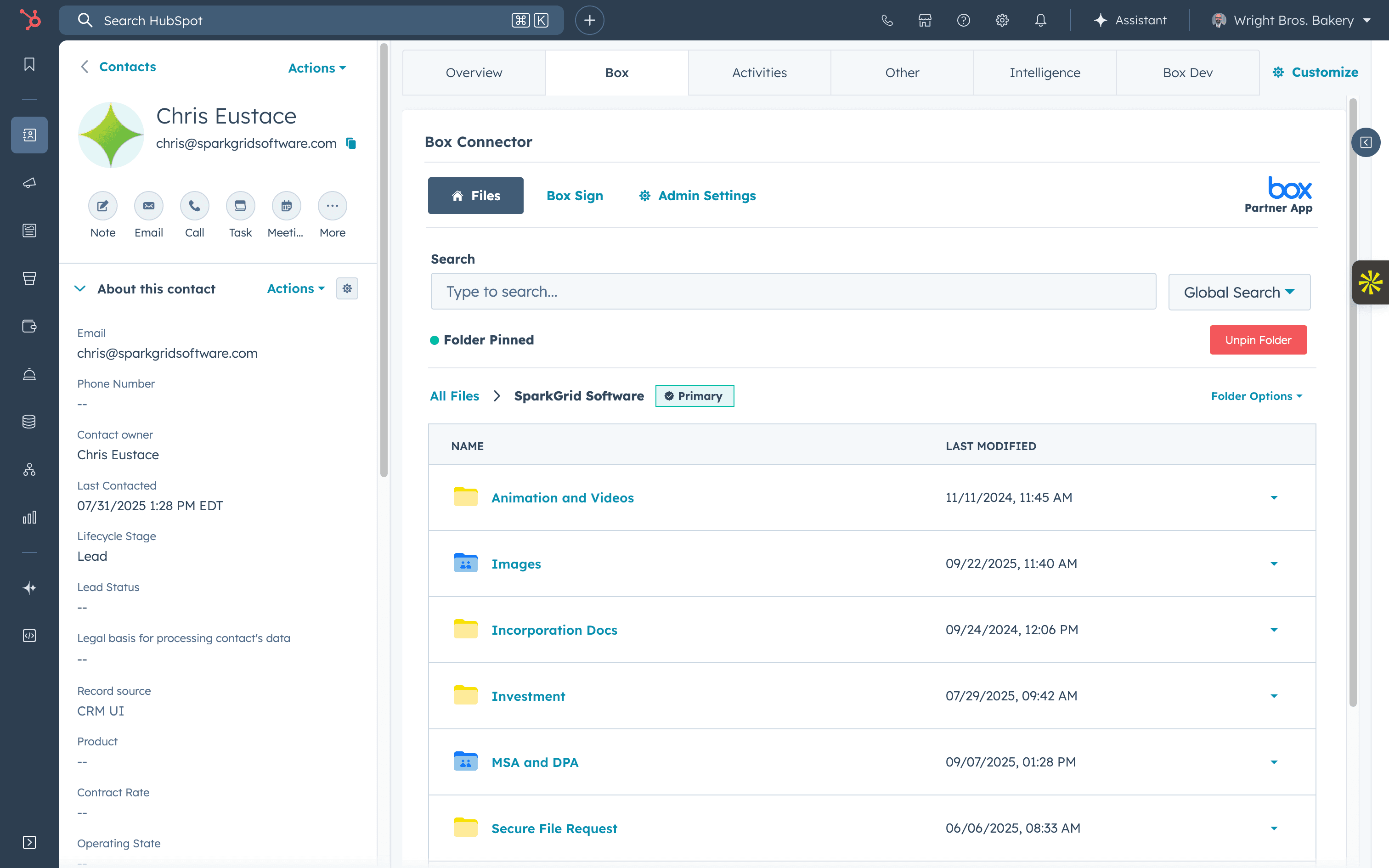
Access every client folder and document without leaving HubSpot so your team can find, preview, and share files instantly.

See Box files instantly on Contact, Company, Deal, Ticket, and Custom Object records
Work without switching tools by managing Box documents directly inside HubSpot
Keep access secure with Box permissions automatically applied for every user
See and manage Box
files
where you work
Access every client folder and document without leaving HubSpot so your team can find, preview, and share files instantly.
See Box files instantly on Contact, Company, Deal, Ticket, and Custom Object records
Work without switching tools by managing Box documents directly inside HubSpot
Keep access secure with Box permissions automatically applied for every user
See and manage Box
files
where you work
Access every client folder and document without leaving HubSpot so your team can find, preview, and share files instantly.
See Box files instantly on Contact, Company, Deal, Ticket, and Custom Object records
Work without switching tools by managing Box documents directly inside HubSpot
Keep access secure with Box permissions automatically applied for every user
Automate repeatable
tasks
inside HubSpot
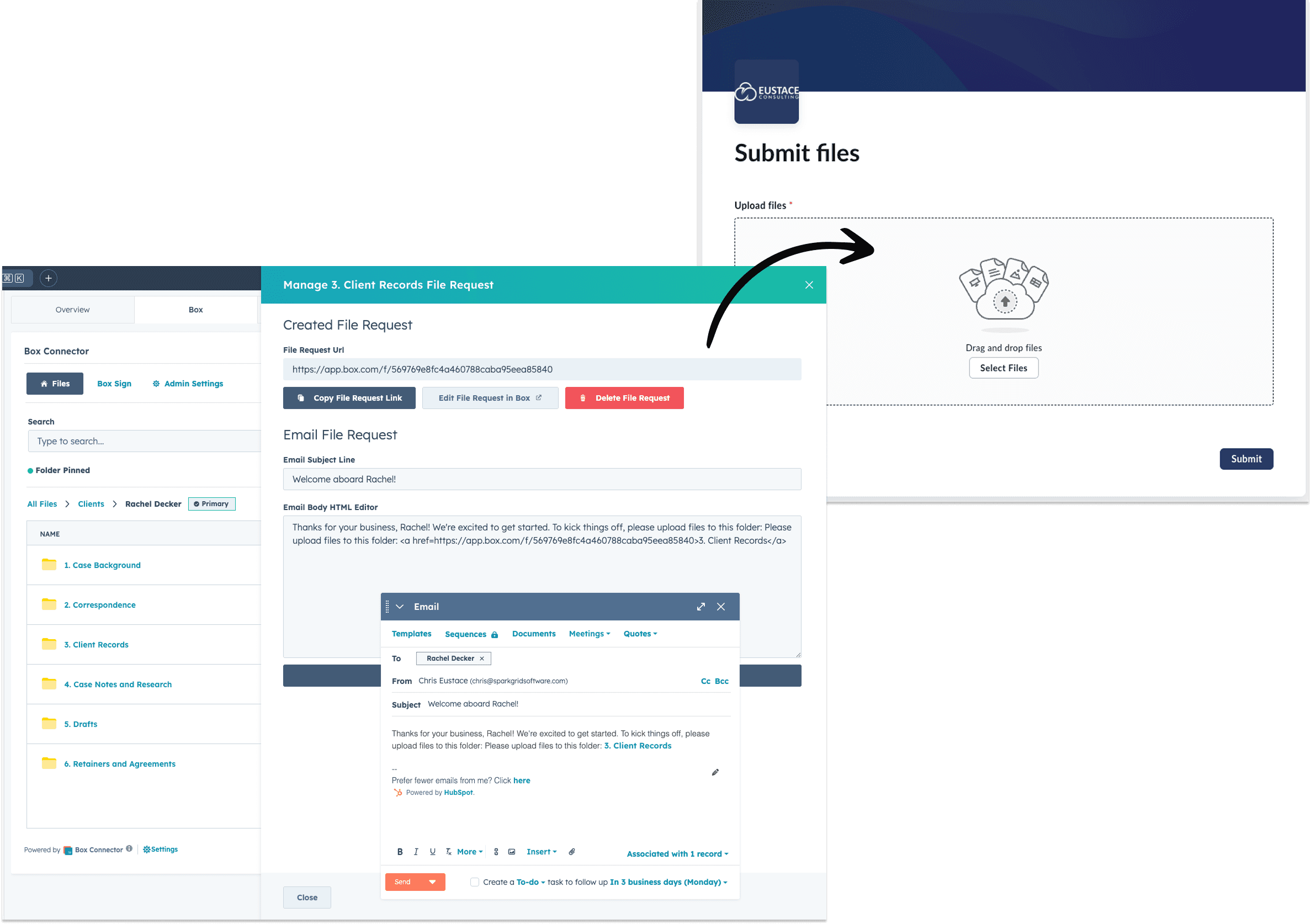
Stop manually creating folders, moving files, and requesting contracts. Every HubSpot customer instantly connects to the right Box folders and workflows.
Trigger secure Box file upload requests automatically from HubSpot
Files & folders that create, move, and sort themselves based on triggers, like when a new client onboards
Use 42 no-code Box workflow actions to eliminate manual file management for good
Automate repeatable
tasks
inside HubSpot
Stop manually creating folders, moving files, and requesting contracts. Every HubSpot customer instantly connects to the right Box folders and workflows.
Trigger secure Box file upload requests automatically from HubSpot
Files & folders that create, move, and sort themselves based on triggers, like when a new client onboards
Use 42 no-code Box workflow actions to eliminate manual file management for good
Automate repeatable
tasks
inside HubSpot
Stop manually creating folders, moving files, and requesting contracts. Every HubSpot customer instantly connects to the right Box folders and workflows.
Trigger secure Box file upload requests automatically from HubSpot
Files & folders that create, move, and sort themselves based on triggers, like when a new client onboards
Use 42 no-code Box workflow actions to eliminate manual file management for good
Sign and share
documents
effortlessly
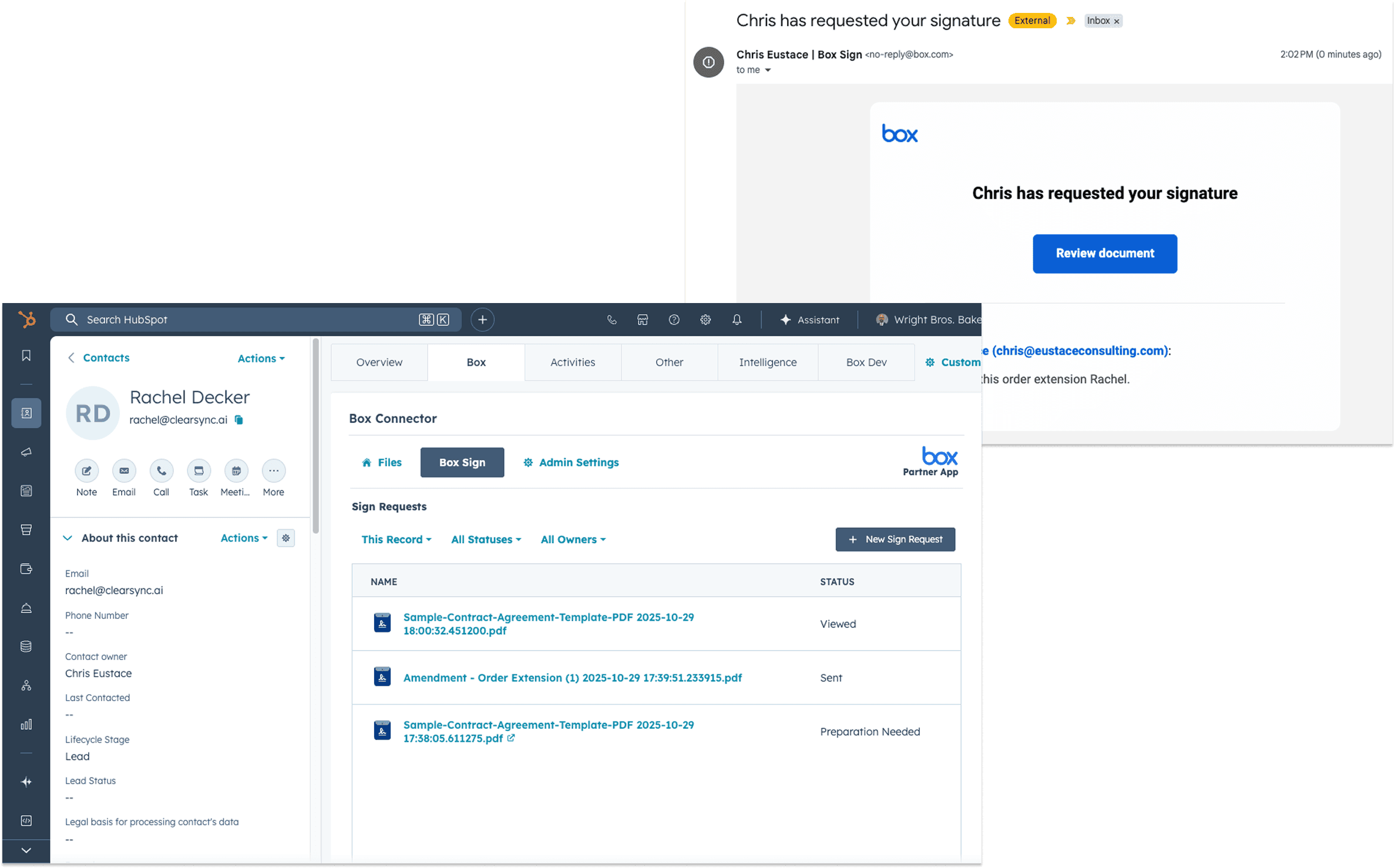
Send, track, and sync signatures without leaving HubSpot.
Monitor every signature in real time by initiating, viewing, and tracking Box Sign requests directly from HubSpot
Personalize every document automatically by mapping HubSpot properties to Box Sign templates for a tailored customer experience
Send unlimited e-signatures for free with your Box Business plan or above
Sign and share
documents
effortlessly
Send, track, and sync signatures without leaving HubSpot.
Monitor every signature in real time by initiating, viewing, and tracking Box Sign requests directly from HubSpot
Personalize every document automatically by mapping HubSpot properties to Box Sign templates for a tailored customer experience
Send unlimited e-signatures for free with your Box Business plan or above
Sign and share
documents
effortlessly
Send, track, and sync signatures without leaving HubSpot.
Monitor every signature in real time by initiating, viewing, and tracking Box Sign requests directly from HubSpot
Personalize every document automatically by mapping HubSpot properties to Box Sign templates for a tailored customer experience
Send unlimited e-signatures for free with your Box Business plan or above
Enterprise Only
Turn chaos into clarity
with
Box AI
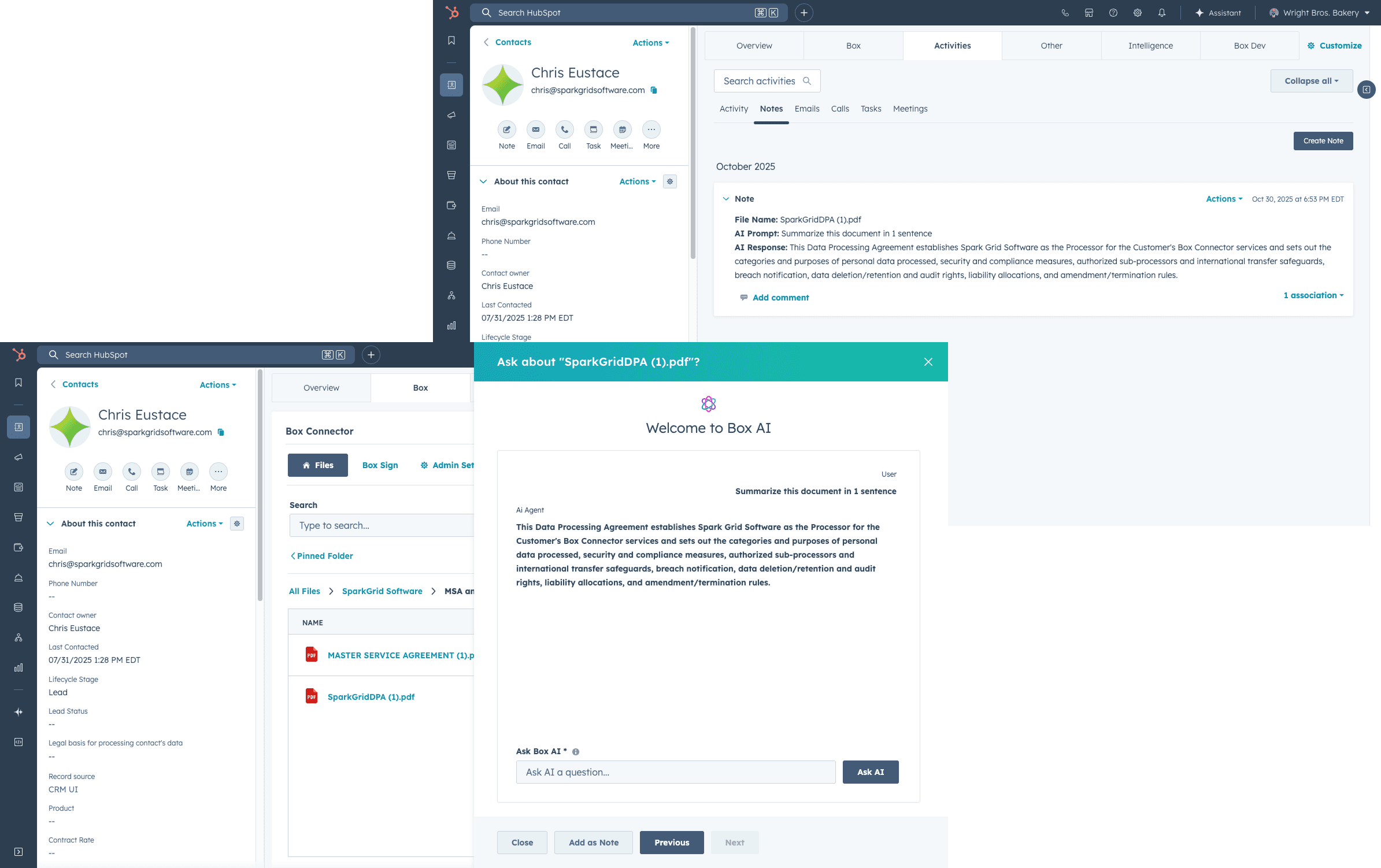
Box AI automatically names, sorts, and files your documents in the right place so you never waste time hunting for files again.
Find and summarize any document instantly by asking questions in natural language within HubSpot
Files organize themselves into the correct Box folders and link to the right HubSpot records automatically
From “IMG_2487.pdf” to “Jane Smith's Driver’s License”, Box AI reads and renames files automatically for instant clarity
Enterprise Only
Turn chaos into clarity
with
Box AI
Box AI automatically names, sorts, and files your documents in the right place so you never waste time hunting for files again.
Find and summarize any document instantly by asking questions in natural language within HubSpot
Files organize themselves into the correct Box folders and link to the right HubSpot records automatically
From “IMG_2487.pdf” to “Jane Smith's Driver’s License”, Box AI reads and renames files automatically for instant clarity
Enterprise Only
Turn chaos into clarity
with
Box AI
Box AI automatically names, sorts, and files your documents in the right place so you never waste time hunting for files again.
Find and summarize any document instantly by asking questions in natural language within HubSpot
Files organize themselves into the correct Box folders and link to the right HubSpot records automatically
From “IMG_2487.pdf” to “Jane Smith's Driver’s License”, Box AI reads and renames files automatically for instant clarity
See Box Connector in action
See Box Connector in action


Security
Built on Box's security & compliance
Built on Box's security & compliance
Compliance you can trust
Built on Box’s enterprise-grade security. Box’s certifications include SOC 2, ISO 27001, FedRAMP, PCI DSS, ITAR and GDPR, and Box and HubSpot both support HIPAA.
Secure by design in HubSpot
Every file stays in Box, under Box’s compliance and access controls, extending enterprise security into HubSpot.
Purpose-built for regulated teams
Built for financial, legal, and regulated industries that need airtight compliance inside HubSpot.
Testimonials
What teams say about
working with
SparkGrid
Box Connector saves us four or five hours a week in data entry of setting up folders.

Robbie M
Creative Director
@ToolKit Services
It's honestly a flawless integration.

Nic P
RevOps Architect
@Aptitude 8
Email attachments were a nightmare—files would get lost or outdated, creating confusion. With the integration, all documents are managed within HubSpot, ensuring the latest versions are always accessible and reducing the chaos. Box Connector automated the flow of data across platforms, streamlining everything and eliminating the need for constant manual updates.

Charlie F
CTO
@Sustainability Roundtable
What used to take hours each week now happens automatically, allowing our team to focus on strategic initiatives instead of admin work.

Alex S
COO
@Root Financial
I’ve been working with Chris and the team over at SparkGrid Software for more than a decade. The product and services they have provided to HubSpot Customers have been instrumental to HubSpot’s growth and customer retention. If you are looking for a fully integrated seamless experience within HubSpot, look no further than Box Connector.

Chris A
Mid-Market Sales Manager
@HubSpot
An even better integration than the native one between Salesforce and Box.

Jorge R
CEO
@OnPeak Energy
SparkGrid’s integration of Box, HubSpot, Box AI, and Box Sign delivers a unified, powerful platform for managing content, automating contracts, and enhancing collaboration. Teams can now securely store, share, and sign documents directly within HubSpot while leveraging AI to boost efficiency. This solution streamlines workflows and accelerates business growth, all with SparkGrid’s expertise guiding the way.

Dan O
Strategic Partnerships
@Box
Testimonials
What teams say about
working with
SparkGrid
Box Connector saves us four or five hours a week in data entry of setting up folders.
Robbie M
Creative Director
@ToolKit Services
It's honestly a flawless integration.
Nic P
RevOps Architect
@Aptitude 8
Email attachments were a nightmare—files would get lost or outdated, creating confusion. With the integration, all documents are managed within HubSpot, ensuring the latest versions are always accessible and reducing the chaos. Box Connector automated the flow of data across platforms, streamlining everything and eliminating the need for constant manual updates.
Charlie F
CTO
@Sustainability Roundtable
An even better integration than the native one between Salesforce and Box.
Jorge R
CEO
@OnPeak Energy
SparkGrid’s integration of Box, HubSpot, Box AI, and Box Sign delivers a unified, powerful platform for managing content, automating contracts, and enhancing collaboration. Teams can now securely store, share, and sign documents directly within HubSpot while leveraging AI to boost efficiency. This solution streamlines workflows and accelerates business growth, all with SparkGrid’s expertise guiding the way.
Dan O
Strategic Partnerships
@Box
Testimonials
What teams say about
working with
SparkGrid
Box Connector saves us four or five hours a week in data entry of setting up folders.
Robbie M
Creative Director
@ToolKit Services
It's honestly a flawless integration.
Nic P
RevOps Architect
@Aptitude 8
Email attachments were a nightmare—files would get lost or outdated, creating confusion. With the integration, all documents are managed within HubSpot, ensuring the latest versions are always accessible and reducing the chaos. Box Connector automated the flow of data across platforms, streamlining everything and eliminating the need for constant manual updates.
Charlie F
CTO
@Sustainability Roundtable
An even better integration than the native one between Salesforce and Box.
Jorge R
CEO
@OnPeak Energy
SparkGrid’s integration of Box, HubSpot, Box AI, and Box Sign delivers a unified, powerful platform for managing content, automating contracts, and enhancing collaboration. Teams can now securely store, share, and sign documents directly within HubSpot while leveraging AI to boost efficiency. This solution streamlines workflows and accelerates business growth, all with SparkGrid’s expertise guiding the way.
Dan O
Strategic Partnerships
@Box
FAQs
Frequently asked questions about Box and HubSpot document workflows
Can Box integrate with HubSpot?


How can companies manage Box files inside HubSpot?
Can HubSpot automatically create folders in Box?
What document workflows can be automated between Box and HubSpot?
Can Box Sign be used with HubSpot?
How does Box Connector support secure document workflows?
Who is Box Connector best for?
How long does implementation take?
FAQs
Frequently asked questions about Box and HubSpot document workflows
Can Box integrate with HubSpot?
How can companies manage Box files inside HubSpot?
Can HubSpot automatically create folders in Box?
What document workflows can be automated between Box and HubSpot?
Can Box Sign be used with HubSpot?
How does Box Connector support secure document workflows?
Who is Box Connector best for?
How long does implementation take?
FAQs
Frequently asked questions about Box and HubSpot document workflows
Can Box integrate with HubSpot?
How can companies manage Box files inside HubSpot?
Can HubSpot automatically create folders in Box?
What document workflows can be automated between Box and HubSpot?
Can Box Sign be used with HubSpot?
How does Box Connector support secure document workflows?
Who is Box Connector best for?
How long does implementation take?
Ready to make Box and HubSpot work better together?
Reduce manual work, improve document visibility, and create more consistent customer and operational workflows with Box Connector for HubSpot.




SparkGrid Software developed Box Connector for HubSpot, helping organizations manage Box files, automate document workflows, support e-signatures, and connect document activity to CRM records.
Ready to make Box and HubSpot work better together?
Reduce manual work, improve document visibility, and create more consistent customer and operational workflows with Box Connector for HubSpot.
SparkGrid Software developed Box Connector for HubSpot, helping organizations manage Box files, automate document workflows, support e-signatures, and connect document activity to CRM records.
Ready to make Box and HubSpot work better together?
Reduce manual work, improve document visibility, and create more consistent customer and operational workflows with Box Connector for HubSpot.
SparkGrid Software developed Box Connector for HubSpot, helping organizations manage Box files, automate document workflows, support e-signatures, and connect document activity to CRM records.