

BLOG
HubSpot Box Integration: Comprehensive Security Compliance for Enterprise CRM

Chris Eustace


Keep Your CRM’s Files Under Box’s Enterprise-Grade Security Certifications
In today’s regulatory landscape, businesses need more than just powerful CRM functionality—they need enterprise security that stands up to the strictest industry standards. The HubSpot Box integration helps by connecting HubSpot’s industry-leading CRM platform to Box, so files stay in Box under Box’s comprehensive security certification portfolio.
Box’s Security Certifications
International Standards and Frameworks
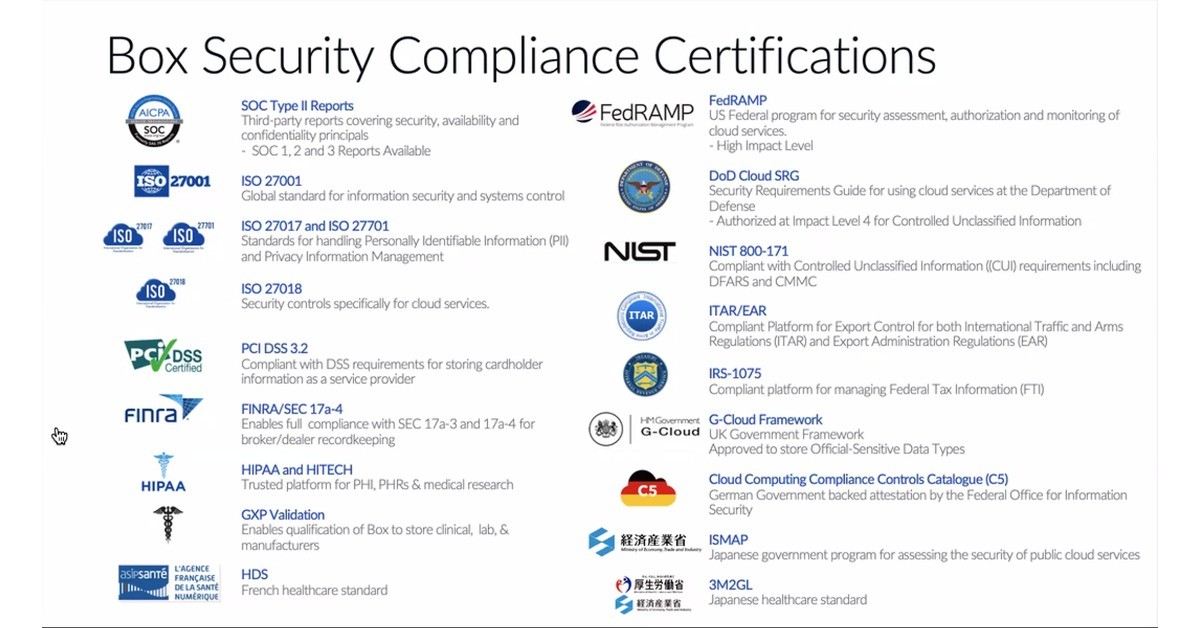
Box’s SOC 2 Type II Reports cover its controls for security, availability, and confidentiality. Box’s third-party SOC 1, 2, and 3 reports give enterprise customers and regulators auditable evidence for the platform where your files live, and SparkGrid has completed its own SOC 2 Type 2 audit.
Box’s ISO 27001 certification covers global information security management for the files your HubSpot workflows use, while Box’s ISO 27017 and ISO 27701 certifications specifically address cloud services and Personally Identifiable Information (PII) privacy management—important for GDPR programs and international data protection.
ISO 27018 focuses specifically on security controls for cloud services, ensuring your customer data in HubSpot maintains enterprise-grade protection standards.
Healthcare: Box and HubSpot Support HIPAA
Healthcare organizations can leverage HubSpot’s powerful CRM capabilities while files containing Protected Health Information (PHI) stay in Box. Box and HubSpot both support HIPAA, a BAA is available, and Box supports medical research data management within familiar CRM workflows.
GXP Validation ensures pharmaceutical, biotechnology, and medical device companies can use HubSpot for clinical, laboratory, and manufacturing data while meeting FDA and international regulatory requirements.
Box also covers additional healthcare standards, including HDS (French healthcare standard) and 3M2GL (Japanese healthcare standard), for global healthcare programs.
Government and Federal Standards in Box
Box’s FedRAMP High Impact Level authorization lets government agencies and contractors keep sensitive federal files in Box while using HubSpot for the relationship. FedRAMP is the US Federal program for security assessment, authorization, and monitoring of cloud services.
DoD Cloud SRG (Security Requirements Guide) authorization at Impact Level 4 allows Department of Defense contractors to manage Controlled Unclassified Information (CUI) within HubSpot workflows.
Box’s NIST 800-171 support addresses Controlled Unclassified Information requirements for files, including DFARS and CMMC standards essential for defense contractors.
Financial Services Security
Box’s PCI DSS 3.2 compliance covers cardholder information stored in Box, for e-commerce, payment processing, and financial services organizations that store, process, or transmit credit card data.
Box’s FINRA/SEC 17a-4 capabilities support broker/dealer recordkeeping requirements, so financial services firms can use HubSpot while retention-controlled records stay in Box.
Box’s IRS-1075 support covers Federal Tax Information (FTI) stored in Box, critical for tax preparation services, accounting firms, and government agencies managing sensitive tax data.
International Government Standards
G-Cloud Framework approval from the UK Government enables public sector organizations to store Official-Sensitive data types within HubSpot, meeting stringent British government security requirements.
Box’s Cloud Computing Compliance Controls Catalogue (C5) attestation is German government-backed, issued by the Federal Office for Information Security, and relevant to European data protection standards.
Box’s ISMAP (Japanese government program) registration reflects an assessment of the security of public cloud services for Japanese government and enterprise use.
Export Control and Trade Standards in Box
Box’s support for ITAR/EAR requirements (International Traffic in Arms Regulations and Export Administration Regulations) covers controlled files kept in Box, critical for defense contractors and companies dealing with controlled technology exports.
Why Security Compliance Matters for Your HubSpot Implementation
Regulatory Risk Mitigation
Enterprise organizations face significant penalties for data breaches and compliance failures. The HubSpot Box integration helps by keeping regulated files in Box, so teams get powerful CRM functionality without moving sensitive documents into HubSpot.
Enterprise Sales Enablement
Security questionnaires and compliance requirements often delay or prevent enterprise sales. With files kept in Box under Box’s certifications, and SparkGrid’s SOC 2 Type 2 report available under NDA, sales teams can engage more confidently with regulated industries and government contracts.
Global Market Access
International expansion requires meeting diverse regulatory standards. From European GDPR frameworks to Japanese government programs, keeping files in Box lets global CRM operations build on Box’s international certifications.
Audit Readiness
Third-party audits and compliance reviews get simpler when your CRM’s files sit in one platform with its own published certifications. Point auditors to Box’s reports and SparkGrid’s SOC 2 Type 2 report.
Industry-Specific Benefits
Healthcare Organizations can manage patient relationships, research data, and medical device sales in HubSpot while files stay in Box; Box and HubSpot both support HIPAA.
Financial Services firms gain access to powerful CRM tools while meeting PCI DSS, FINRA, and banking regulatory requirements.
Government Contractors can leverage HubSpot’s capabilities for defense contracts, federal projects, and sensitive government data management.
International Enterprises can rely on Box’s global certifications for files, enabling consistent CRM operations across multiple jurisdictions and regulatory frameworks.
Implementation and Getting Started
SparkGrid's HubSpot Box integration seamlessly connects Box’s enterprise security to your existing CRM workflows. Implementation typically involves:
Compliance Assessment: Identify which certifications align with your industry requirements
Integration Setup: Configure Box connector within your HubSpot environment
Data Migration: Securely transfer existing data while maintaining compliance standards
Team Training: Ensure your team understands new compliance capabilities and workflows
Ongoing Monitoring: Leverage Box’s reporting and audit trail features
Transform Your CRM with Enterprise Security
The HubSpot Box integration represents more than just another software connection—it changes where your CRM’s documents live: in Box, under enterprise-grade security, instead of in HubSpot attachments. Whether you’re managing healthcare data, government contracts, financial information, or international operations, keeping files in Box gives your organization a stronger security foundation.
Ready to explore how Box’s enterprise security can support your HubSpot implementation? Contact our team to discuss your specific regulatory requirements and discover how this integration can accelerate your business growth while maintaining the highest security standards.
Chris Eustace
CEO
@SparkGrid Software


