

BLOG
The Real Reason You Can't Use HubSpot for CMMC or FedRAMP Work, and How to Fix It
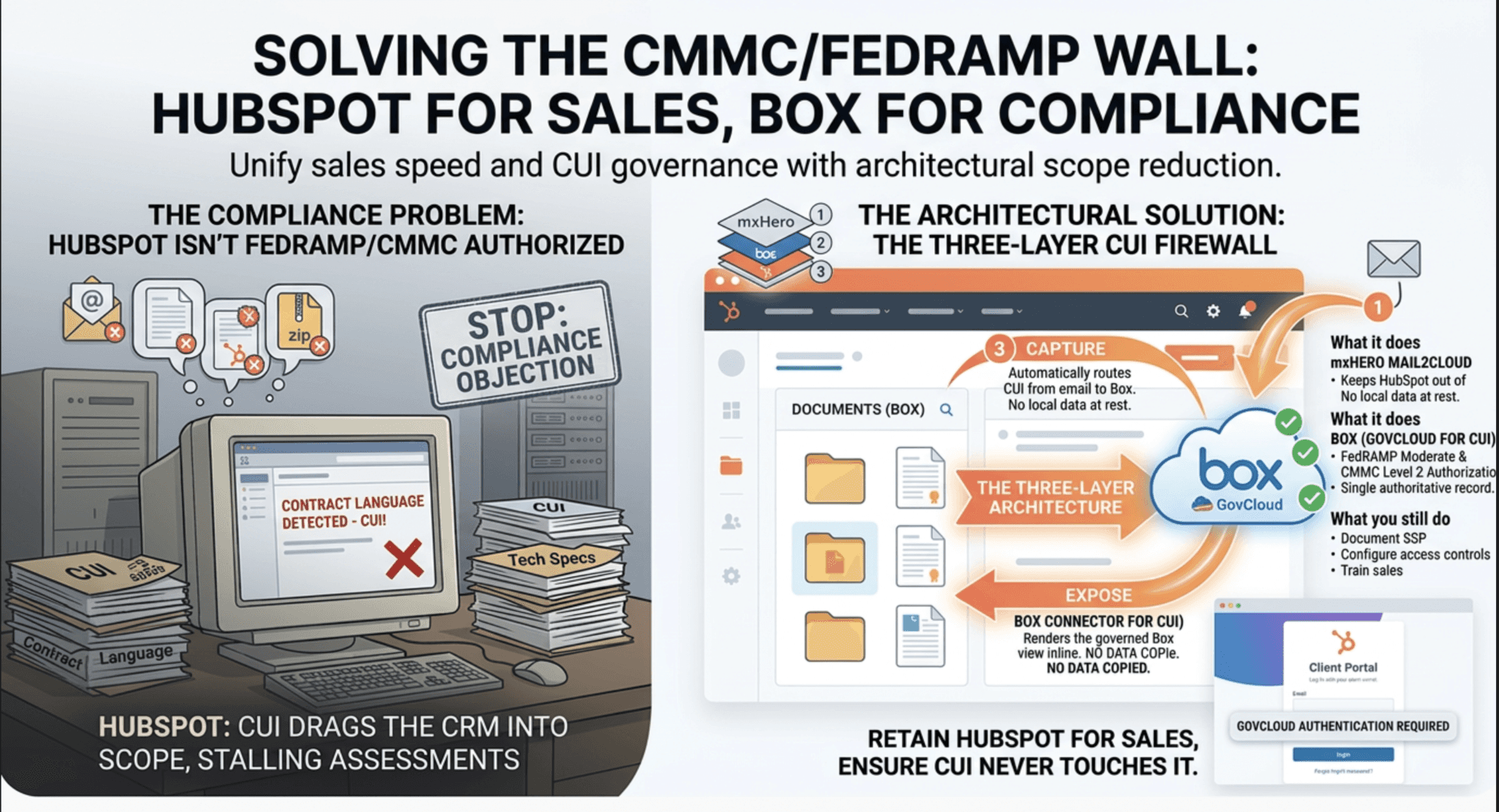


Every defense contractor and FedRAMP-adjacent company we talk to eventually hits the same wall: they love HubSpot, their sales team is fast in it, their pipeline reporting is built around it — and then compliance says no.
The objection is always the same, and it's not wrong: HubSpot is not FedRAMP authorized and was never built to hold CUI. The moment a rep pastes contract language into a deal note, forwards a technical spec into a logged email, or attaches a statement of work to a record, that content is now sitting inside a system that has no place in your authorization boundary. For a company pursuing CMMC Level 2 or working FedRAMP-adjacent deals, that's not a hypothetical risk — it's the finding that stalls your assessment or the reason your security team bans the CRM outright.
So most companies end up with a bad choice: rip out HubSpot and move sales onto something clunkier but "compliant," or keep using HubSpot and quietly hope nothing sensitive ever lands in it.
There's a third option, and it's the one we build for clients: keep HubSpot exactly as is, and make sure the sensitive content never actually touches it. This post walks through the architecture — mxHero for capture, Box for governance, and the Box Connector for HubSpot to expose everything to sales — that lets you answer "is HubSpot in scope?" with a documented no.
Why this matters for CMMC and FedRAMP specifically
A few things are true right now that shape how this architecture should be built:
CMMC Phase 1 is live. As of January 2026, the DIB is in Phase 1 of the CMMC rollout, and the Phase 2 deadline later this year will require C3PAO certification for any contract touching CUI. Assessment slots are already backing up, which means gaps found late are expensive gaps.
Box for Government is FedRAMP-authorized, but it isn't a silver bullet. Box GovCloud holds FedRAMP Moderate authorization and is built to support CMMC Level 2 environments, but independent reviews put its out-of-the-box NIST 800-171 coverage around 85%, with real gaps in audit and accountability controls — specifically around audit event logging and audit record protection. Box being certified doesn't make your implementation certified; you still own configuration, access control, and documenting how the tool sits inside your system boundary.
Commercial Box is fine for FCI, not for CUI. If you're only handling Federal Contract Information (CMMC Level 1), standard commercial Box — properly configured, with sharing locked down and MFA enforced — is defensible. The moment you're handling CUI, that's a Box GovCloud (or equivalent authorized environment) conversation.
HubSpot is the obstacle, and it isn't going to become authorized. This is the part worth being blunt about: there is no version of "HubSpot achieves FedRAMP authorization" on any near-term roadmap, and CMMC doesn't grade on effort — either a system is in your boundary or it isn't. Every email, attachment, or note that gets pasted, forwarded, or synced into a HubSpot record drags HubSpot into that boundary. Most compliance headaches we see trace back to exactly this — not carelessness, but "just email it to yourself and log it in the CRM" being muscle memory for sales teams.
Trying to make HubSpot compliant is a losing fight. The move that actually works is architectural: keep HubSpot completely out of the boundary by making sure it never holds the regulated content in the first place.
The three-layer architecture
1. Capture — mxHero Mail2Cloud
mxHero sits at the mail server layer and automatically captures email body, metadata, and attachments as they're sent or received, then routes them into Box under your governance rules — retention policies, access controls, and folder structure all defined by you, not left to whatever a rep happens to do manually. It supports capture from journaling rules, forwarding addresses, or direct filing, so you're not relying on individual reps to remember to archive anything.
The key property here: mxHero doesn't become a second copy of the record. It's a capture and routing layer that writes the authoritative copy into Box.
2. Govern — Box (GovCloud for CUI)
Once email lands in Box, it inherits whatever access policies, retention rules, and audit logging you've configured there — the same governance already applied to your other regulated content. For CUI-handling environments, that means Box for Government specifically, with the audit-and-accountability gaps mentioned above closed through supplemental logging or documented compensating controls in your SSP. For FCI-only environments, well-configured commercial Box can be defensible on its own.
This is also where the scope-reduction argument gets made to an assessor: the sensitive content lives in exactly one authorized system, with one set of access controls, one retention policy, and one audit trail — instead of being scattered across mail servers, PSTs, and CRM attachment fields.
3. Expose — Box Connector for HubSpot
This is the layer that actually resolves the objection. The Box Connector surfaces the relevant Box-stored emails and files directly on the HubSpot deal, contact, or company record — rendered inline for the rep to view, search, and work with, right where they already work. Critically, the content itself never copies into HubSpot's data layer. HubSpot is rendering a governed view into Box, not storing a duplicate of the record. Nothing regulated ever crosses into HubSpot's infrastructure, which means HubSpot never enters the conversation about what's "in scope."
That's the answer to the objection that started this: your security team isn't wrong that HubSpot can't hold CUI. They're just evaluating the wrong system. With this architecture, HubSpot was never asked to hold it.
What this does — and doesn't — get you
To be direct about the limits: this architecture gives you a defensible, documented answer to "is HubSpot in scope?" — but it doesn't make HubSpot magically compliant, and it doesn't replace the rest of your assessment work. You still need to:
Document the full data flow (mxHero → Box → HubSpot view) in your SSP, showing HubSpot as a display layer with no data at rest
Confirm which Box environment (commercial vs. GovCloud) matches your FCI/CUI mix
Close the specific NIST 800-171 audit-control gaps that apply to your Box configuration
Configure and document access controls rather than relying on defaults
Train sales on not defeating the architecture — pasting content directly into HubSpot fields instead of relying on the Box view undoes all of this
What you get in exchange is the outcome most of these conversations are actually trying to reach: your team keeps HubSpot, your compliance story holds up, and the "we can't use our CRM" fight goes away for good.
If HubSpot has been the sticking point in your CMMC or FedRAMP-adjacent compliance push, that's exactly the kind of conversation we like having.


